Direct overview
Do not begin with the question, “How old is the website?” Begin with a more useful one: which parts of the website are preventing people from understanding, trusting or contacting the business?
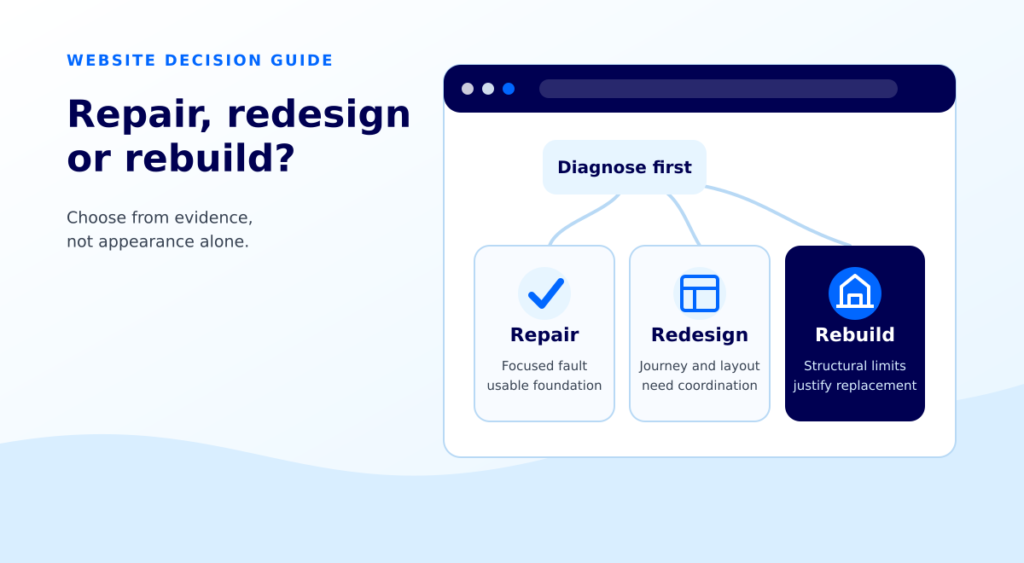
A focused repair is usually the better first step when the problem is isolated and the underlying website is still safe, editable and maintainable. A redesign on the same platform makes sense when the content and buyer journey need coordinated improvement but the technical foundation is usable. A rebuild becomes reasonable when the structure, templates, code or ownership make reliable improvement harder than replacement.
The decision should come from evidence, not a dislike of the current colors or a promise that a new website will automatically rank or convert better.
Contents
- Define repair, redesign and rebuild
- Use the decision matrix
- Check the business journey before the platform
- Work through a fictional example
- Compare the full cost and risk
- Protect search visibility during a rebuild
- Set accessibility, mobile and measurement acceptance
- Ask better questions before requesting a quote
- Frequently asked questions
Define repair, redesign and rebuild
These terms are often used loosely, which makes quotes difficult to compare.
Repair
A repair changes a limited, identifiable problem while keeping most of the current website intact.
Examples include:
- Fixing a form that no longer delivers or confirms a successful submission
- Correcting a broken mobile layout on a small number of sections
- Replacing outdated service information
- Improving one unclear page and its inquiry path
- Removing duplicate tracking events
- Repairing links, labels or image alternatives
A repair should still include diagnosis and testing. Changing a button color without checking the destination and form journey is decoration, not a repair.
Redesign on the existing platform
A redesign changes the information hierarchy, content, layouts and visual system while keeping a workable content management system, hosting arrangement and much of the underlying setup.
This can be appropriate when the site is technically serviceable but feels inconsistent, explains services poorly or uses several templates that no longer reflect how buyers make decisions.
Rebuild
A rebuild replaces a substantial part of the website foundation. It may involve new templates, a new theme or block system, a different information architecture, a new content model, a hosting move, or a change of content management system.
A rebuild can solve structural problems. It also creates migration work. Content, URLs, forms, tracking, structured data, integrations and permissions must all be accounted for. A rebuild is not a reset button for weak positioning, missing proof or slow follow up.
Use the decision matrix
Choose the scale of change
- Repair: Start here when the fault is isolated, the foundation remains maintainable, and the result can be tested.
- Redesign in place: Choose coordinated content and layout work when the platform can support the required changes reliably.
- Stabilize and assess a rebuild: Consider replacement when structural or technical constraints make reliable improvement impractical. Resolve ownership, inventory URLs and protect working contact routes before migration.
Use this matrix as a first sorting tool, not as a substitute for a technical review.
Scroll the comparison sideways when needed. Keyboard users can focus the comparison and use the arrow keys.
| What you find | Repair first | Redesign on the same platform | Rebuild candidate |
|---|---|---|---|
| One broken form, link or contact route | Usually | Rarely | No, unless it reveals wider instability |
| Unclear hero, weak proof or confusing next step | Test targeted content and layout | When the issue repeats across templates | Only if the current stack cannot support the needed pattern |
| Mobile problems in a few sections | Fix responsive rules and retest | When many shared templates need restructuring | When the architecture makes maintainable correction impractical |
| Slow key pages | Diagnose images, scripts, server response and real user data | When template overhead is systemic | Only after platform constraints are demonstrated |
| Untrusted analytics or conversion events | Audit measurement first | Preserve agreed event definitions | A rebuild alone will not make tracking trustworthy |
| Content no longer matches buyer intent | Rewrite and reorganize selected pages | When navigation and page patterns need coordinated change | When the content model cannot support the required structure |
| Plugin, theme or code conflicts | Stabilize, inventory and isolate | When a supported redesign removes brittle dependencies | When maintenance and migration evidence favor replacement |
| Ownership, editing or handover is unclear | Resolve access and asset ownership first | Possible after control is restored | Do not rebuild until the business controls its domain, hosting, site and analytics |
Three conclusions are possible:
- Repair now. The problem is limited, the foundation is usable and the fix can be tested.
- Redesign in place. The site needs a coordinated content and layout improvement, but replacement would add unnecessary migration risk.
- Stabilize, then plan a rebuild. Serious technical, structural or ownership issues need a controlled transition rather than an urgent visual makeover.
Check the business journey before the platform
Many website problems are described as design problems when the real gap sits elsewhere.
Start with a real buyer journey:
- How does the person arrive?
- Which service or problem are they trying to understand?
- What scope, proof and location information do they need?
- What action should they take?
- How does the business confirm that the action became an inquiry?
- How does the team decide whether that inquiry is suitable?
If visitors land on a general page that does not explain the advertised service, a new theme will not fix the mismatch. If a form works but the team does not record whether inquiries are suitable, a new analytics dashboard will not answer the commercial question.
Rattle’s guide to clear website design explains the information a service buyer often needs before contact. The conversion tracking service shows why a contact click, a received inquiry and a qualified lead should remain separate signals.
Worked example: a cleaning company website
This is a fictional example. It does not describe a Rattle client or predict an outcome.
Imagine a commercial cleaning company with a six year old WordPress website.
The owner reports four concerns:
- The mobile contact button overlaps text on two service pages.
- The office cleaning page receives visits but does not explain property types or service areas.
- A form submission appears twice in analytics.
- The team can edit pages, but the layouts look inconsistent.
Step 1: separate the problems
The mobile overlap is a responsive defect. The missing service information is a content and page structure problem. The duplicated form event is a measurement problem. The inconsistent layouts may be either local styling drift or a shared template problem.
Step 2: test the smallest credible intervention
The business could first:
- Repair the two affected mobile sections
- Rewrite the office cleaning page around buyer questions
- Correct and validate the form event
- Review the remaining templates for the same structural pattern
If those changes can be implemented cleanly and the other templates remain maintainable, a rebuild would be premature.
Step 3: identify the rebuild trigger
Suppose the review finds that every service page uses a different custom template, important content is hard coded, the mobile rules conflict across plugins and the business cannot update the theme safely. At that point, the repeat cost and risk of isolated fixes may support a rebuild.
The evidence changed the decision. The website did not become a rebuild candidate merely because it was six years old.
Compare the full cost and risk
The cheapest quote is not always the least expensive path. Compare the work, external costs and responsibilities behind each option.
Scroll the comparison sideways when needed. Keyboard users can focus the comparison and use the arrow keys.
| Scope area | What to confirm |
|---|---|
| Discovery | Current pages, templates, forms, integrations, analytics, media and account ownership |
| Content | What will be retained, edited, rewritten or reorganized, and who supplies evidence and approvals |
| Design and production | Priority templates, responsive compositions and reusable patterns |
| Migration | URL changes, page to page redirects, canonicals, internal links and sitemap checks |
| Forms and integrations | Which contact routes, calendars, payments, CRM or messaging tools must work |
| Measurement | Events to preserve, duplicate checks, test records and reporting destinations |
| Quality assurance | Browsers, viewports, keyboard journeys, staging, backup and rollback |
| Support | Updates, content changes, reporting and post launch responsibility |
A rebuild with weak content can reproduce the same buyer confusion in a cleaner layout. “Form installed” is also not the same as successful delivery and follow up. Ask for explicit acceptance checks, not only a list of features.
Rattle’s WordPress website design service confirms scope after reviewing content, functionality and project requirements. That tailored judgment, production, migration and testing is the paid work. The basic decision framework should not be hidden from buyers.
Protect search visibility during a rebuild
Keeping the same domain does not eliminate migration risk. URLs, internal links, canonicals and page content can still change.
Google recommends mapping old URLs to their new destinations, using permanent server side redirects for permanent moves, updating internal links and checking canonical annotations. It also warns that significant site changes can produce ranking fluctuations while pages are recrawled and reindexed. See Google Search Central’s site move guidance.
A practical migration register should include:
- Every current indexable URL
- Its keep, merge, replace or retire decision
- The destination URL where a permanent move is required
- Current title, canonical and important internal links
- Priority content and evidence that must be retained
- Form and tracking dependencies
- Prelaunch and post launch checks
Avoid changing the domain, content management system, information architecture and visual design simultaneously unless the business case requires it and the risk is managed. Google’s guidance specifically recommends making major changes one at a time where possible.
Do not delete an old page simply because a replacement draft exists. Verify the new page, redirect, canonical, links and public response first.
Set accessibility, mobile and measurement acceptance
A new design is not complete because the desktop screenshot looks polished.
Accessibility and responsive checks
W3C WCAG 2.2 requires content to reflow at a width equivalent to 320 CSS pixels without losing information or functionality, except where two dimensional layout is essential. Interactive elements also need visible keyboard focus, and minimum target size or spacing rules apply. Review the current WCAG 2.2 standard.
For a service website, acceptance should include:
- One logical heading structure
- Keyboard access to navigation, links, buttons and forms
- Labels and understandable error messages
- Text and controls with sufficient contrast
- No horizontal page overflow at narrow widths
- Images that have a useful contextual alternative when needed
- A reading order that remains clear when columns stack
- Motion that is restrained and respects reduced motion preferences
Performance checks
Do not choose a rebuild from one Lighthouse run. Lab tests are useful for diagnosis, while field data reflects the experience of actual users. Google’s web.dev guidance describes Core Web Vitals as field metrics and recommends evaluating them at the 75th percentile of page visits. See the current Core Web Vitals guidance.
Use repeatable tests, record device and network assumptions, and identify the specific resources or templates causing a problem. A large hero image may need image work, not a new content management system.
Measurement checks
Before and after the change, confirm:
- A successful form submission can be distinguished from a button click
- Phone and messaging clicks remain intent signals, not assumed conversations
- Test inquiries are labeled
- Duplicate events are not firing
- Agreed event names and destinations are documented
- The business has a separate way to record suitable inquiries and customers
Ask better questions before requesting a quote
Share enough information for a provider to diagnose the work instead of guessing from the home page:
- Which pages and contact routes matter most?
- What is visibly wrong, and on which devices?
- Which parts are difficult for the team to update?
- Does the business control the domain, hosting, WordPress and analytics accounts?
- Which content, URLs, proof and integrations must be retained?
- Is there a current backup and staging path?
- What has already been measured or tested?
- Who will approve the work, and what support is expected after launch?
Ask each provider to separate diagnosis, content, design, production, migration, tracking, external tools and ongoing support. That makes repair, redesign and rebuild quotes more comparable.
Frequently asked questions
Can I redesign my website without changing its URLs?
Often, yes. Preserving useful URLs can reduce migration complexity, but the current template, content structure and technical setup still need review. If a URL changes permanently, map and test the redirect rather than removing the old page without a plan.
Does a website rebuild improve Google rankings?
Not automatically. A rebuild can improve structure, content, speed or usability when those problems are diagnosed and fixed. It can also create search disruption if URLs, internal links, canonicals or content are mishandled. Treat ranking improvement as a hypothesis to measure, not a guaranteed rebuild benefit.
Can an Astra or Spectra website be repaired without a rebuild?
Often, but the answer depends on the installed versions, block structure, theme settings, custom CSS, plugin interactions and how widely a problem appears. Inspect the current source and test a contained repair before assuming the entire site must be replaced.
Should I rebuild because my website is old?
Age alone is not a sufficient reason. Security support, maintainability, editing difficulty, buyer clarity, mobile behavior and integration reliability are more useful evidence.
What if the current tracking is unreliable?
Repair or define the measurement before using it to judge a redesign. Preserve agreed event definitions through any migration and verify them again after launch. A new website does not automatically fix duplicate or poorly defined events.
How long should I monitor a rebuild after launch?
There is no universal period. Monitor critical pages, forms, redirects, crawl and indexation signals, analytics configuration and received inquiries from launch onward. Search reprocessing time varies with the size and nature of the change, so use actual Search Console and business records rather than a fixed ranking deadline.
Match the scale of change to the evidence
Repair when the fault is local and the foundation remains useful. Redesign in place when the buyer journey and visual system need coordinated improvement. Rebuild when structural or technical constraints make reliable improvement harder than replacement. The scope should grow only when the evidence does.
Use the copyable website brief to record the current site, observed problems and the parts that must be retained. Implementation, migration and testing are agreed separately.