
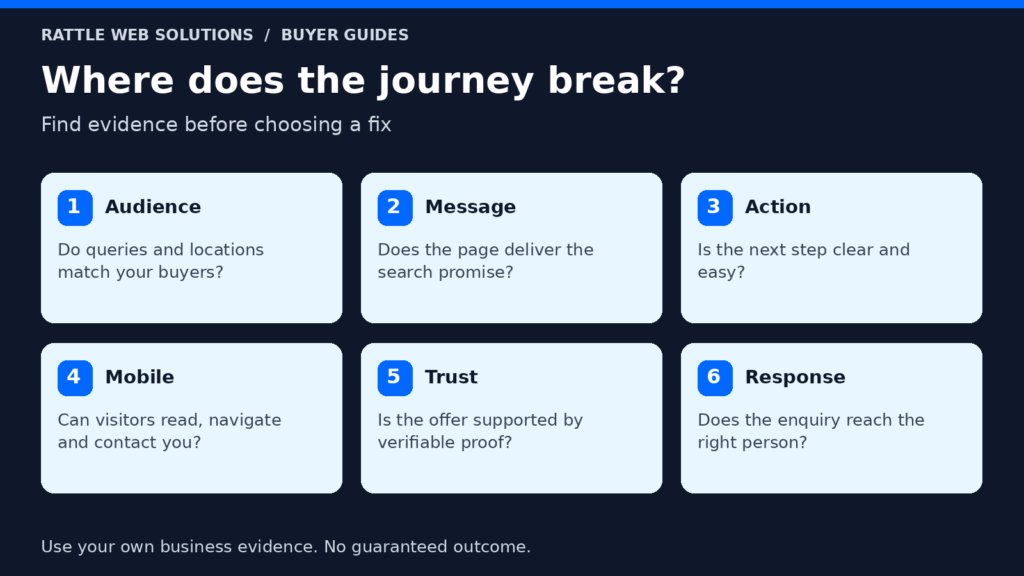
A useful investigation starts with three separate questions: Who arrived? What did they expect? What happened after they tried to contact you? A page view cannot answer all three. Neither can an analytics “conversion” that fires on a phone tap without confirming a conversation.
First, check whether the apparent gap is real
Small numbers fluctuate. Ten visits and no forms is not enough to declare a design failure. A dashboard may omit calls, WhatsApp conversations, repeat visits or leads captured in a different system. Conversely, a platform can count clicks on a contact button while the business has received no usable request.
For a defined period, gather:
- Landing pages and traffic sources, separated where possible into organic search, paid search, direct and referral.
- Search queries and paid search terms where available.
- Completed forms, calls actually answered, bookings and other received inquiries.
- Qualified leads, sales opportunities and customers from the CRM or a simple lead log.
- Device and location data, with the understanding that these reports are estimates and may contain noise.
The goal is not a more impressive chart. It is to establish where the chain breaks. If the volume is too low to compare, record that uncertainty and focus on obvious usability faults and evidence collection.
Problem 1: the wrong visitors arrive
A page can receive traffic from searches that do not fit the service. A marketing agency may attract students researching a definition rather than business owners ready to buy. A local contractor may receive inquiries outside its coverage. A paid campaign may match broad terms that mix consumer, job seeker and commercial intent.
Look at the query and landing page together. Does the visitor want the service, a tutorial, a job, a free tool or a different location? For paid search, inspect actual search terms and targeting options. Google says location targeting uses signals and is a best effort rather than a perfect boundary. Read its location targeting guidance.
The fix may be to tighten the audience, use clearer service and location language, add negative keywords where warranted, or create content for a distinct research question. A large jump in raw visits is not success if qualified inquiries stay flat.
Problem 2: the page breaks the promise made in search
The search result or ad sets an expectation. If the visitor asks for conversion tracking and lands on a generic agency home page, they must work too hard to find the relevant offer. A service page should explain who it helps, what is included, what is excluded or scoped, how the work proceeds and what the visitor should do next.
Read the title, first screen and CTA as a buyer. Can you identify the service and relevant location without scrolling? Does the page use concrete language? Does it distinguish a service outcome from a guarantee? Are prices or a scoping path clear enough for the buying stage?
Google evaluates ad landing pages in part on relevance, usefulness, navigation and consistency with the ad. See its landing page guidance. Even without ads, the same expectation test is useful for search visitors.
A better page need not be longer. Put the most important answer early, then add scope, process, evidence and FAQs where they help the decision. Avoid repeating a generic pitch across every service page.
Problem 3: the CTA is unclear or the form adds friction
“Get in touch” can work when the visitor already knows the next step. For a complex service, a more specific invitation may help: request a lead generation plan, ask for a tracking review or describe the campaign problem. The CTA should say what will happen after the click without implying an instant result the team cannot deliver.
Test every route on a phone and a desktop:
- Does the main CTA lead to the intended page?
- Does the form load, accept a realistic valid entry and show a success state?
- Does the submission actually reach the intended inbox or CRM?
- Does the team receive enough context to respond usefully?
- Are phone and messaging links correct?
- Does the privacy explanation reflect the data collected and technology in use?
Do not submit live test inquiries without an agreed test procedure. A form that merely renders has not been proven to deliver. Equally, a visible error message inside a third party embed may be a hidden state rather than a current failure. Verify the complete path.
Ask only for information needed for the first useful conversation. An elaborate qualifying form can deter a good buyer; a form with no context can create vague, costly follow-up. Balance friction against the team’s ability to triage.
Problem 4: the mobile experience is slower or harder
Visitors may abandon a page because important content is hidden, a banner covers the CTA, images shift the layout, text is hard to read or the form is difficult to use on a phone. Test a real mobile viewport rather than assuming a desktop design compresses well.
Start with the first screen, navigation, contact action and form. Then look at measured performance. A lab speed score is a diagnostic, not a lead count; field data, if available, describes actual users but can be sparse for a low traffic site. Fix obvious large images and blocking elements without stripping the page of helpful evidence.
An accessibility pass also improves usability: descriptive headings, readable contrast, labels, keyboard navigation and meaningful image alternatives help visitors complete the task. A decorative hero image should not obscure the service message.
Problem 5: the offer is not yet credible
The visitor may understand the offer but hesitate because the page does not show who provides the service, how scope is agreed, what the business can verify or what support follows. Specific proof can help, but invented testimonials or unapproved revenue claims do the opposite.
Use evidence that can be explained: a real case study with context, the work actually performed, a dated reporting period and limitations; a clear process; ownership of accounts and assets; and transparent pricing or a scoping method. A case study should distinguish observed actions from attributable customers and revenue.
For Rattle, the SK Party Hall case study can help a local buyer understand an actual project. It should be read as a specific case, not a universal forecast. A service page can link to it where the context fits, and a buyer should still be told what evidence is available for their own proposed scope.
Problem 6: the lead reaches a weak response process
The website can deliver a valid inquiry and still appear to “convert poorly” if the business replies late, misses calls, cannot serve the location, or fails to record outcomes. The fix may be operational rather than visual.
Create a basic lead stage definition:
| Stage | Evidence | Useful question |
|---|---|---|
| Contact action | Form success, answered call or confirmed message | Did a usable inquiry reach the business? |
| Valid lead | Real person and relevant request | Is this genuine and in scope? |
| Qualified lead | Fit against agreed service, location and budget criteria | Can we reasonably help? |
| Opportunity | A proposal or next sales step was accepted | Is there a real buying process? |
| Customer | Agreement or sale recorded | Did the work produce commercial value? |
Do not label a page view or button click as a qualified lead. Keep diagnostic events available, but measure the outcomes that matter to the business. Our conversion tracking service explains the implementation scope.
How to prioritize fixes without guessing
Choose one page and one acquisition source. Record a baseline for a sensible period, including the number of qualified leads rather than only a percentage. Then use the evidence to choose one intervention:
| Observed gap | Evidence to inspect | First useful action |
|---|---|---|
| Wrong visitors arrive | GSC queries, Ads search terms, service-area reports and CRM rejection reasons | Align the page and targeting to the service and territory. |
| Relevant visits, little CTA use | Page purpose, device view, first-screen clarity and buyer observation | Clarify scope, proof and the next step. |
| CTA use, no received inquiry | Form success tests, call connection, embed errors and CRM delivery | Repair the first failed step and confirm receipt. |
| Received inquiries, poor fit | Service, location, need and commercial reasons in the lead log | Make buyer fit and scope clearer before scaling traffic. |
| Qualified leads, few sales | Response time, proposals, objections and lost reasons | Review follow-up and the sales offer. |
Change one major variable at a time when possible. Annotation matters: if an ad campaign, page design and form all change together, it is difficult to know which change helped. Low volume may not support a statistically strong A/B test. Use usability observation, call review and lead quality notes instead of pretending a tiny percentage shift is conclusive.
Review after seven days for faults and delivery, then after about a month for a more stable direction. For slow buying cycles, customer outcomes need longer follow-up. A 15 day check can identify a broken path, but it cannot promise a return on investment.
Frequently asked questions
Is a high bounce rate always a problem?
No. A visitor may find a phone number and leave, or a tracking setup may not capture an interaction. Interpret engagement metrics alongside actual inquiries and page purpose. A diagnostic signal is not a verdict.
Should I add more CTAs?
Only if they clarify the next step. Repeating the same vague button throughout a page can add noise. Use a consistent primary action, with a secondary contact route when appropriate, and make both work.
Can a blog post bring leads directly?
It can, but research content often assists a later decision. A helpful article should answer its question, then link naturally to the relevant service and contact route. Judge it on relevant organic visibility, engaged readers and assisted or direct qualified inquiries, not just page views.
How do I know whether ads or the website are the problem?
Compare search terms, locations, the landing page, completed inquiry events and lead quality. If the visits are irrelevant, start upstream. If relevant people arrive but the form fails, repair the site. If leads arrive but do not fit, revisit offer, targeting and qualification.
Find the weakest link
Traffic is an input. A qualified inquiry is a stronger signal, and a customer outcome is stronger still. Trace a sample of journeys and repair the first point where expectations and reality diverge.
Rattle Web Solutions can review WordPress website structure, Google Ads targeting and landing pages and conversion tracking. If your site gets visits without the right inquiries, share the page and the lead problem so the next change can be based on evidence.
If the main concern is paid traffic, the Google Ads readiness guide helps separate campaign suitability from a weak landing page or response process.
The next step depends on the gap. Generate Inquiries connects relevant visits with clearer contact journeys. Improve Lead Quality addresses inquiries that do not match your service, market or agreed scope.